如果你不想使用谷歌字體部分默認(rèn)Helvetica Neue Helvetica或Arial,你也可以準(zhǔn)備自己的字體加載。例如,你可以將myfonts.com自定義字體,從它fontspring.com或fontsquirrel.com或使用webfonts發(fā)生器(建議方法!)請(qǐng)確保您下載@字體面板套件。

1.所有你需要做的是復(fù)制和粘貼的字體文件,作一些編輯你的Custom.css文件。在這個(gè)例子中,我們將解釋如何可以添加自定義字體AlexBrush你joomshaper模板。該方法可用于基于HELIX3框架模板。
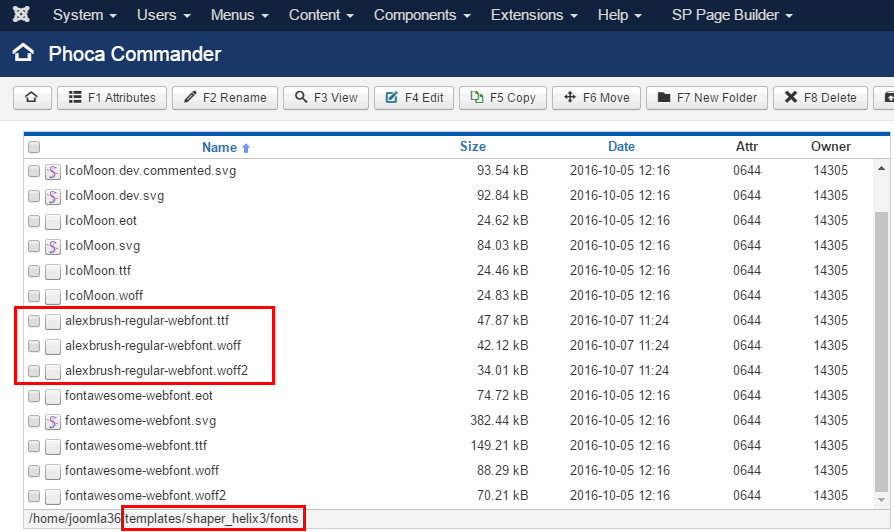
請(qǐng)把所有的字體文件(EOT TTF SVG)從模板包相同的模板文件夾模板讓其他字體,例如:template\shaper_helix3 \font
它使用FTP工具。
2.現(xiàn)在打開stylesheet.css應(yīng)生成的字體包,在我的例子中,它看起來(lái)像這樣:
@font-face {
    font-family: 'alex_brushregular';
    src: url('alexbrush-regular-webfont.woff2') format('woff2'),
         url('alexbrush-regular-webfont.woff') format('woff'),
         url('alexbrush-regular-webfont.ttf') format('truetype');
    font-weight: normal;
    font-style: normal;
}
3.但我們需要改變路徑的文件,我建議使用下列更改(.. /font/):
 @font-face {
    font-family: 'alex_brushregular';
    src: url('../fonts/alexbrush-regular-webfont.woff2') format('woff2'),
         url('../fonts/alexbrush-regular-webfont.woff') format('woff'),
         url('../fonts/alexbrush-regular-webfont.ttf') format('truetype');
    font-weight: normal;
    font-style: normal;
}
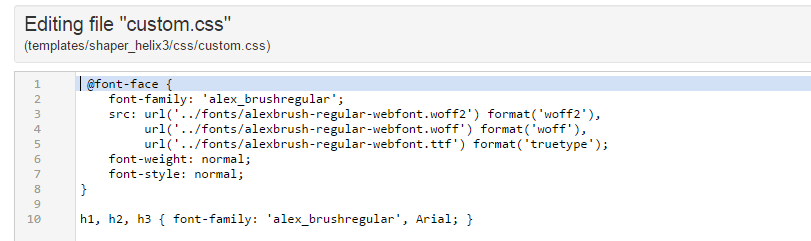
4.現(xiàn)在打開或創(chuàng)建文件/文件夾里面Custom.css CSS(在joomshaper模板)和副本更新代碼。
5.一旦您添加字體到您的模板的字體目錄,您可以應(yīng)用到您的網(wǎng)站。現(xiàn)在你必須選擇新的字體選擇的CSS選擇器或HTML標(biāo)簽,里面還Custom.css文件,例如:
h1, h2, h3 { font-family: 'alex_brushregular', Arial; }
這里是我的示例文件的內(nèi)容
6.您也可以替換默認(rèn)的字體顏色和你喜歡的字體字體大小,同時(shí)使用一個(gè)基本的CSS規(guī)則。
7.如果你想使用自定義字體的HTML標(biāo)簽或菜單項(xiàng)等,請(qǐng)關(guān)閉(禁用)在字體選項(xiàng)卡谷歌字體!。
前端最終結(jié)果